
Customer Story – Chesapeake Bay Program

Beyond the Search Bar:
How the Chesapeake Bay Program Built a Fully Custom, Accessible Experience with Cludo’s API
Problem
ChesapeakeBay.net’s existing out-of-the-box search experience couldn’t fully match the site’s complexity. As content grew, so did the need for better discoverability, and a search experience tailored to different audiences.
Needs
A fully customizable, accessible search experience that could fit seamlessly into the site’s design system, surface the right content quickly, support AI responsibly, and give the web team complete control over the search experience.
Solution
Cludo’s Search API enabled the Chesapeake Bay Program to build a custom search experience from the ground up, complete with user-tested UX, accessible components, AI Summary with transparent citations, and analytics that help continuously improve search quality.
The Chesapeake Bay Program is a partnership of government, academic, nonprofit, and individual stakeholders working to restore, conserve, and protect the Bay. Its flagship site, ChesapeakeBay.net, serves two audiences: the interested public—which includes students, teachers, and those who live, work, and play in the Bay region—and the partners and staff who collaborate across dozens of agencies and organizations. It draws 800,000+ visits a year.
For a website with this much content and this many audiences, search has to do more than simply return results.
Seven Years In, Time to Go Beyond the Template
The Chesapeake Bay Program had been using Cludo for roughly seven years, dating back to when Google’s free site search was being phased out. The Web Team, staffed by the University of Maryland Center for Environmental Science (UMCES), needed something that could index the large volume of PDFs the partnership produces. Cludo’s out-of-the-box templated solution fit the bill through several website redesigns.
“We had always wanted to improve the usability of search because we knew it was important,” says Dan Brellis, Web Developer. “Through testing, we saw users preferring search over traditional navigation menus. Search was working, but we knew it could do more.”
During their latest major site evaluation, the team decided to update their site search, this time rebuilding the experience using Cludo’s Search API instead of the standard templates.
“A lot of the other platforms we looked at just said, ‘Here’s your search, and there it is.’” says Dan. “The ability to have an API to customize it and do whatever we needed, that was a real driver for us.”
Designing Search Around Real User Behavior
Before writing any code, the team focused on how people actually searched on their site. They ran both interviews and usability testing with public visitors and internal staff, since these two groups use the site very differently.
Some findings were very broad, informing the team’s decision to embed breadcrumbs, images and videos in search results, make it easier to download files and export calendar events, and allow users to filter by both content type and date range. Others—like the order of filters and the microcopy used for button labels and error messages—were highly specific.
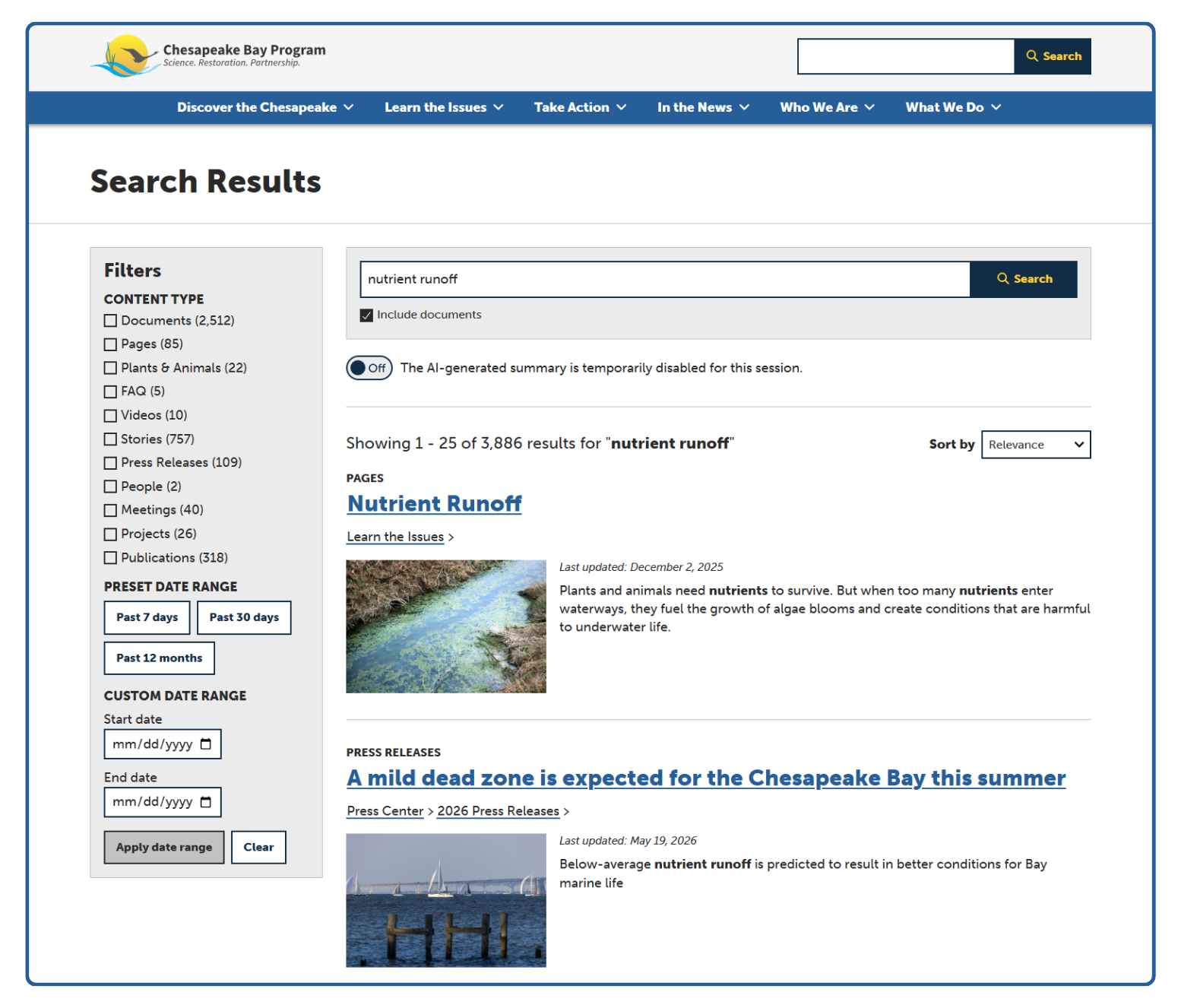
“Being able to incorporate those existing UI patterns from elsewhere on our site was really important.” — Catherine Krikstan, Web Product Manager
The team put it simply: don’t treat search as solved just because you have a search bar.
On a site with this much content and scale, a generic results template becomes a bottleneck. The solution is investing in research before investing in features.
Making AI a Feature People Could Trust
When the team first scoped the rebuild, they weren’t even sure features like AI Summary were something they’d use. Their organization was in the process of developing formal AI policies, and they knew people reacted to AI very differently. So they tested it the same way they tested everything else: with real users before committing.
That research surfaced three requirements that shaped the final experience: clear labeling that the content was AI-generated (“Powered by ChatGPT”), visible source citations linking back to Chesapeake Bay Program content, and an on/off toggle that gave visitors control over when AI Summary appeared.
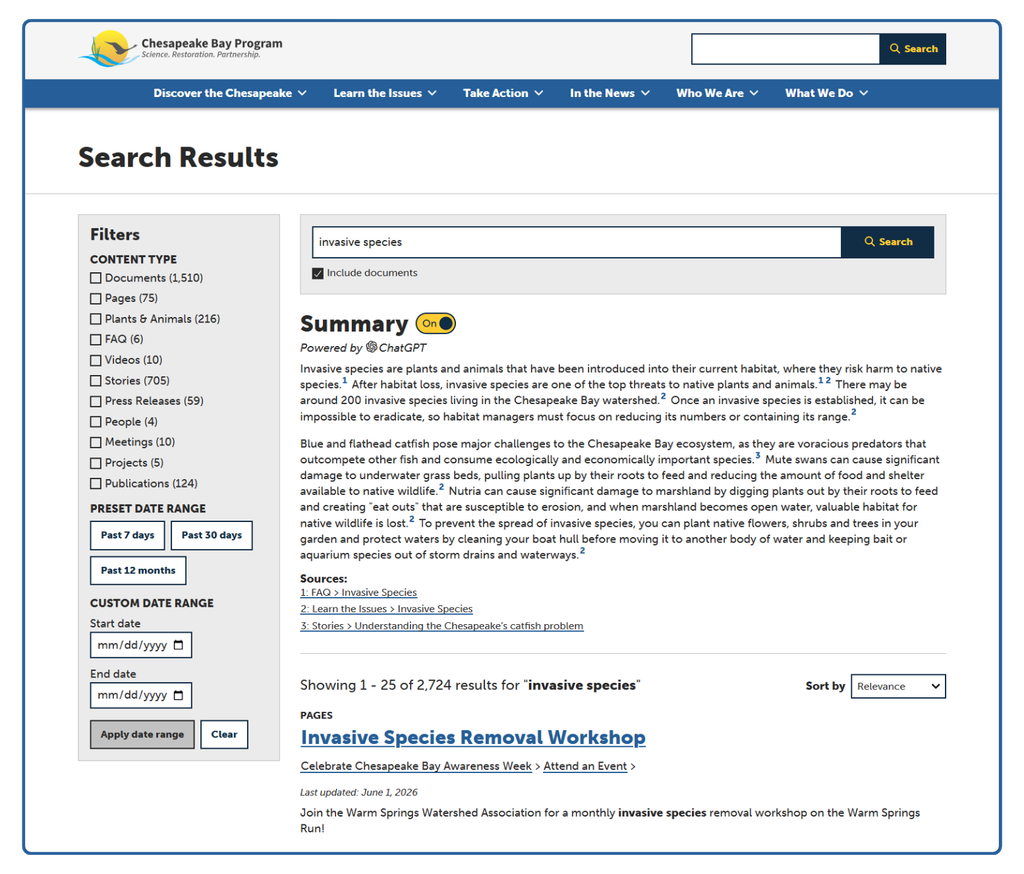
“We found that even people who generally disliked or distrusted AI still valued our summaries because of the transparency and user controls we built in,” says Dan.
Because AI Summary only references Chesapeake Bay Program content, that focused knowledge base quickly proved its value. Soon after launch, a colleague participating in a community science project used the new search to identify a fish an osprey had caught. General-purpose AI tools couldn’t confidently identify it, but Cludo’s AI Summary did.
“[He] told us our AI Summary outperformed Claude and Gemini because it was able to surface information that was very specific to our site,” says Catherine. “It said right away, ‘this fish is a hogchoker.’ It’s an unanticipated strength of a limited knowledge base. You can surface very specific things you might not find quickly if you just Googled it.”
Built Native, Built Accessible
Accessibility was a priority from the start. The team had spent years building accessible experiences across the rest of the site and wasn’t willing to compromise by relying on a third-party search widget.
Because the SERP was built with Cludo’s Search API instead of a fixed template, the team wasn’t limited to a generic results page. They recreated search using the same design system and interaction patterns visitors already recognized, including familiar fly-out menus, rich video previews, and document download buttons built directly into search results.
“I always worry that with any third-party tool, you lose the ability to have control and make it what you want,” says Dan. “With a fully accessible, customizable API, we could bring in the tools and components we were already using, including server-side rendering for fast initial page loads, full keyboard support, and accessible modals, all within our own design system. That’s something our team takes a lot of pride in.”
The Feedback Loop Behind Better Rankings
Today, Cludo’s analytics are part of the team’s weekly workflow. The team reviews ineffective searches to decide where to add synonyms or adjust page rankings, and pays particular attention to keyword collisions. “Chesapeake” appears on nearly every page because it’s both a body of water and the organization’s name, so genuinely relevant pages can get buried beneath the noise.
Those optimizations don’t just improve search results. They also improve AI Summary, since answers are generated from the highest-ranked pages.
“AI Summary isn’t going to give you a summary unless the page you actually need is included in the top results,” says Catherine. “So by looking at the full search term, we make sure the right content pages get surfaced, not just the ones that happen to share a keyword.”
Support That Grows With Them
Throughout the project, the Chesapeake Bay Program worked closely with Cludo’s support team to troubleshoot API questions, test new ideas, explore beta features, and fine-tune the experience before launch.
“Anytime we hit a problem, even something API-related, I’d reach out to support and get an immediate, helpful response,” says Dan. “They’d say, ‘Here, try this new beta feature and see if that works better,’ and it worked fantastically.”
The custom search experience may be live, but the work isn’t finished. The Chesapeake Bay Program continues to evolve its search experience, with plans to expand to a second website and explore hybrid AI Search. For the team, search is no longer a feature that’s finished after launch. It’s an evolving part of the user experience.
“It was a big project,” says Catherine. “But we’re really happy with how it turned out.”
Chesapeake Bay Program’s story shows what’s possible when accessibility, user research, and AI transparency shape search from the ground up, not bolted on as an afterthought. If your organization is managing complex content at scale and wants search built around how people actually use your site, talk to our team about what an API-built, accessible search experience could look like for you.
