
Cludo Developer Experience
Our goal is to enable each unique developer to build search in their preferred way. Explore the tools below to get started on your own path.
The Stack
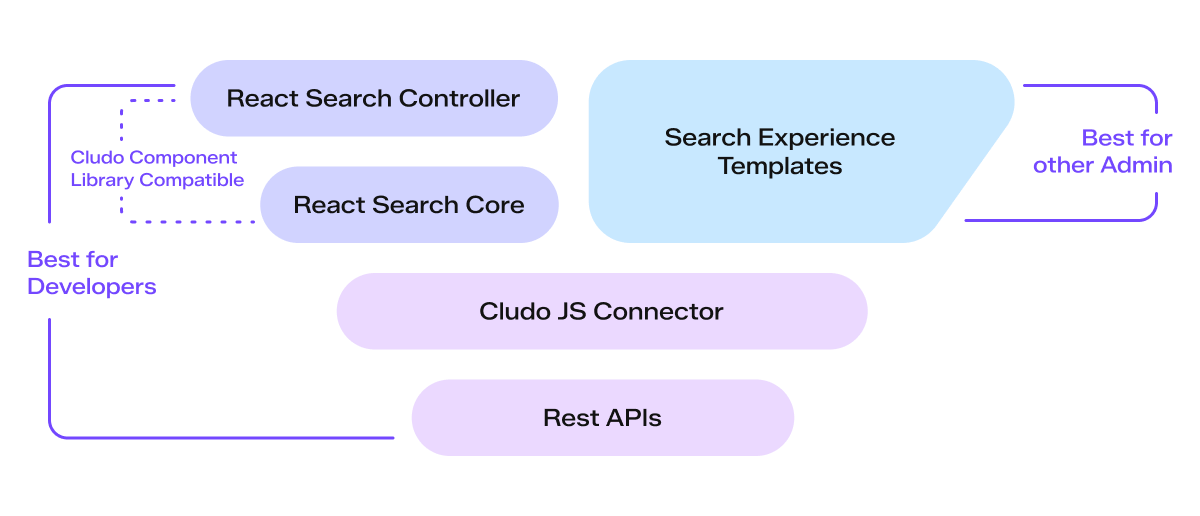
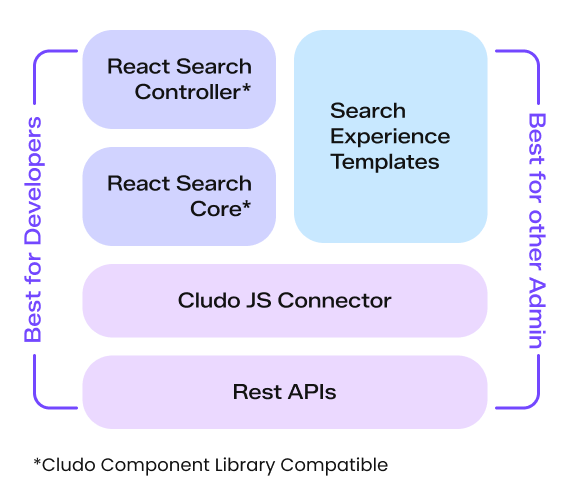
When interfacing with the Cludo tech stack, you have a range of options – from plug-and-play implementations that can be done in minutes to rich APIs that offer endless customizability. This guide will give an overview of those options and link to more detailed documentation for you to explore.
Search Experience Templates
Search Experience Templates are ready-made search templates that offer a robust search experience without the need for custom code. They come in multiple variations and can be easily styled to match your site’s design.
Who should use this?
Any search admin looking for a low code/no code implementation or who want to get a basic search up and running quickly.
React Search Core
The React Search Core library provides core search state and backend communication functionality, but otherwise lets developers handle the integration and rendering of their search UI and the triggering of their own search events. This can also be used with custom components or pre-built components from the Cludo React Component Library.
Who should use this?
Developers who want to fully integrate their search UI into their own React environment and control when and how search events are triggered.
REST APIs
Our collection of REST APIs allow developers to create fully custom search solutions in any code environment. The APIs go beyond the search UI and provide endpoints for manipulating data and configurations in the backend.
Who should use this?
Developers who want to create a backend implementation or otherwise have complete control over how their search solution functions.
Authentication
Before you begin with the APIs, learn how to authenticate your API requests.
Content APIs
Control your search indexes by pushing raw data directly into them or initiating a Cludo crawler to refresh your content.
Search APIs
Make search or autocomplete requests and receive raw sets of results. Change parameters in your requests to manipulate search results with filters, sorting, and other options.
Reporting APIs
Retrieve analytics data to pass to other systems in your tech stack for reporting or processing.
Event Tracking APIs
Record search and user journey events that can be visualized in MyCludo or retrieved through the Reporting API for use in your own system.
