
Design. Deploy. Ship. No developers needed.
Custom build your search experience with Cludo Studio.
Take your search experience from idea to implementation without waiting on a developer or services team.
Cludo Studio guides you through the setup, gives you a full-featured experience out of the box, and generates the exact code your team needs to bring it to life on your site.

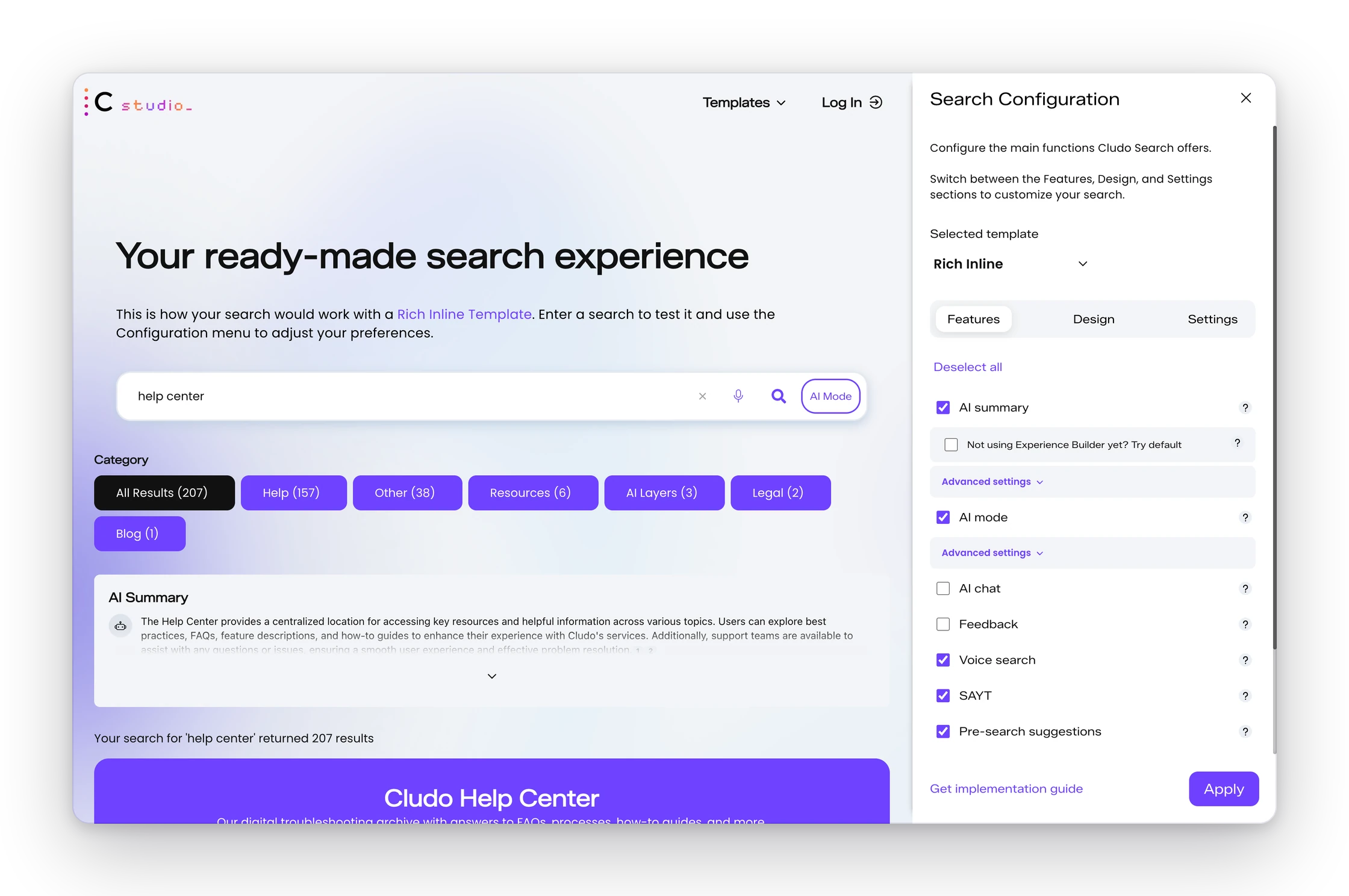
Launch Rich Inline with your in-house team, a partner agency, or a mix of both using the code Cludo Studio generates.
not months. Most organizations go live within a few weeks of kickoff.
organizations have shipped search with the Rich Inline template.
How To Build with Cludo Studio
Five steps from setup to live search
Most of the experience is configured no-code in MyCludo and Experience Builder. With Cludo Studio, your developer no longer pieces the setup together from documentation. The code arrives generated, exactly as you configured it.
Connect your search
Add your Customer ID and Engine ID from MyCludo so Cludo Studio can pull in your real search content.
Choose your features
Turn on the features you want, like AI Summary, AI Mode, Feedback, Voice Search, Search-as-you-type, and Pre-search Suggestions.
Create your design
Customize your layout, colors, filters, facets, buttons, result styling, and more while previewing changes live.
Get your implementation guide
Cludo Studio carries your selections into the CSS, HTML, and JavaScript you need to implement Rich Inline.
Launch and refine
Add the generated code to your site, go live, and fine-tune with your own CSS or advanced settings as needed.
What you can configure
A full baseline, out of the box
Here’s what you get and where each piece is set up.
Search bar
Search-as-you-type, intelligent autocomplete, and voice search, enabled in Cludo Studio and included in your generated code. Pre-search Suggestions are set up in MyCludo.
Layouts
List, grid, and category views, chosen in Cludo Studio. Category view uses the Category field from your crawler setup.
Filters & Facets
Filters come from the Category field in your crawler settings. Facets are custom fields you add in your crawler settings, then Cludo Support turns them on. Placement and multi-select are set in Cludo Studio.
Styling
Set colors, text, shadows, and corner radius in Cludo Studio. Your developer can refine further with CSS.
AI Summary & AI Mode
AI Summary is set up in MyCludo > Experience Builder. AI Mode is turned on in Cludo Studio, and AI Mode design options are coming soon to Experience Builder.
Display fields
Rich Inline supports title, keyword snippet, URL, meta description, image, breadcrumb, date, and badge. Each needs to be set up and confirmed in your crawler settings.
Supporting UX, every subscription
Intelligent 404 and the Feedback Module are included with every Cludo subscription.
Where teams choose Rich Inline vs. a Custom Build
Rich Inline shows the fields above. To surface anything beyond them — say, people results with name, title, phone, and email — those extra fields are set up in the crawler and surfaced through a Custom Build: Cludo’s Implementation Services, an agency, or your internal team using API or React.
What your visitors see
Every piece in place
Before typing, the box offers popular searches and voice input. As they type, query assistance suggests searches and jumps them straight to a page. Example: return policy.
Popular searches
Pricing
Contact support
Locations
Return policy
Suggestions
Results Show all
Choose a layout in the template, filter from your crawler settings, and configure AI in Experience Builder. Example: results for “return policy”.
List view
Grid view
Categorized view
Category filters
AI Summary
AI SUMMARYReturns are accepted within 30 days of purchase. Items must be unused and in original packaging; refunds typically post within 5–7 business days.
The building blocks of a result card, standard in Rich Inline and matched from your content. Toggle between two field mixes on the same result.
Every Cludo subscription includes two visitor-experience features beyond the results page.
Feedback Module
Collects qualitative feedback on whether a page or its content is working for visitors. Place it on the search page or any page.
Was this page helpful?
Intelligent 404
Turns dead links into a recovery path: it reports clicks and referrers, and suggests where the visitor was likely headed. Add popular pages and hand-picked links.
We couldn’t find that page. Try one of these:
Rich Inline vs. custom build
What’s included, and what unlocks with API or React
Rich Inline is the fast, full-featured baseline. API and React are the path when you need deeper customization, typically once you’ve grown into Cludo.
| Feature | Rich Inline | API | React |
|---|---|---|---|
| Search-as-you-type | |||
| Pre-search suggestions | |||
| Voice search | |||
| Categorized results | |||
| Additional facets (list / dropdown) | |||
| Pre-search filters (default filter applied) | |||
| Banners | |||
| AI Summary (via Experience Builder) | |||
| AI Mode (via API) | |||
| Display fields (title, description, keyword snippet, URL, image, breadcrumb, date, badge) | |||
| Additional facets (range: price, date) | ✕ | ||
| Sub-facets | ✕ | ||
| Display selected filters | ✕ | ||
| Sort by (buttons or dropdown) | ✕ | ||
| Related searches | ✕ | ||
| Custom display fields (name, email, phone, course #) | ✕ |
Everything marked with an ✕ is where a custom build (API or React) unlocks more. Display fields are standard in Rich Inline and fully customizable on API and React.
Use Cases
High-Quality Answers for Website Users
Our solution performs best on high-content websites, which are most commonly found in these three sectors:
Public Sector
Provide instant answers via AI Chat or AI Summary to reduce support load and improve citizen or customer experience.


Content-heavy Orgs
Use AI Summary to simplify complex search journeys and help users navigate large knowledge libraries.

Enterprise Intranet
Deploy AI Mode with multi-source integration to unify access to internal documents, systems, and knowledge platforms.
What’s next
Ready to design your search?
Talk to your Cludo team about Rich Inline, or open Cludo Studio and start building a live preview today.
