
What is Boosting and Why It Is Important For Your Website’s Success
Whether you have an important page needing promotion or old documents you want to avoid, Boostings can serve the exact site search results you want.

Cludo

Key takeaways
- Boosting tells your search engine how important a page or section is, so you can promote key content and push down old or less useful pages.
- Without boosting, pages that simply repeat a keyword the most can outrank the pages visitors actually need.
- You can boost by URL, field, metadata, file type, or how recent content is.
- In Cludo, you set boostings yourself in the dashboard, with no developer needed.
Far too few websites have set up boosting for their site search. If yours is one of them, you could be losing potential customers to a bad search experience.
Whether you have an important page that needs promotion or old documents you’d rather visitors didn’t find first, boosting can give you exactly the search results you want.
What is boosting?
Boosting
site search
The process of setting a value for how important a page is to your website’s search. Boosting lets you customize your search results by promoting or deprioritizing certain areas of your website.
Understanding your search engine
Before we explain why and how to set up boosting, it helps to understand how your site’s search engine works.
Say you go to your bank’s website and search for “credit card.” You’ll get a list of results, ranked by a score, with the highest score shown first. Traditionally, that score is based on how many times the search term, in this case “credit card,” appears on the page. The more it appears, the higher the score. Most search engines are a bit more advanced than that: if “credit card” is in a page’s title, it gets an even higher score than if it only appears in the body text.
Illustrative example. Keyword-based scoring rewards the page that repeats the term most, not the page visitors need.
Today, AI-powered search goes further by understanding what visitors mean, not just matching the words they type. But even the smartest search engine doesn’t know your business priorities. That’s where boosting comes in.
Why you should use boosting on your site content
Now that you’re up to speed on how most search engines work, let’s look at why boosting matters.
The problem with the setup above is that pages can rank highly just because the author used the keyword “credit card” a lot. You’ve probably seen sites where a search brings up old news articles first, because the search term appears all over the article.
For example, a webmaster writes a news piece about their “new Platinum Credit Card.” It matters to some people, but most people searching “credit card” should see pages about how to get one, not an old news story.
With boosting set up correctly, you get search results that win you more customers (because it’s easy to apply for a credit card) and help existing customers (with service information on how to activate their card). Useful, relevant search can help your bottom line and make your existing customers a little less frustrated.
Are the right pages ranking first?
Get an audit of how people search on your site, and where they’re giving up.
How to boost the content on your site
There are several ways to boost content on your website, depending on the technology behind your search. Most technologies need a developer to do it for you. With Cludo, you can do it yourself in the dashboard, as we’ll show below.
If your search runs on Lucene-based technology like Solr or Elasticsearch, their documentation explains the different ways to boost results: see Solr’s query guide and Elasticsearch’s boosting query. Before you contact your developer, make sure you already know which areas of your website you want to boost. Common ways to decide:
URL path
Boost or lower every page under a certain path.
e.g./admissions/ at 150%
Field value
Boost pages in a certain category or with a specific value.
e.g. category isServices
Field search
Boost pages when a field like the title or keywords matches the search.
e.g. title matches the queryNumeric field
Give individual pages their own boosting value through a numeric field.
e.g. a page-level priority scoreDate freshness
Temporarily lift newer content, with the boost fading over time.
e.g. news from the last 30 daysFiles
Raise or lower all file results, like PDFs and documents, at once.
e.g. files at 30%How Cludo makes boosting easy
Many of our customers asked to be able to adjust boostings themselves, so we made it simple. In Cludo, you’ll find boostings under Tools › Boostings, where you can set them up for each of your search engines.
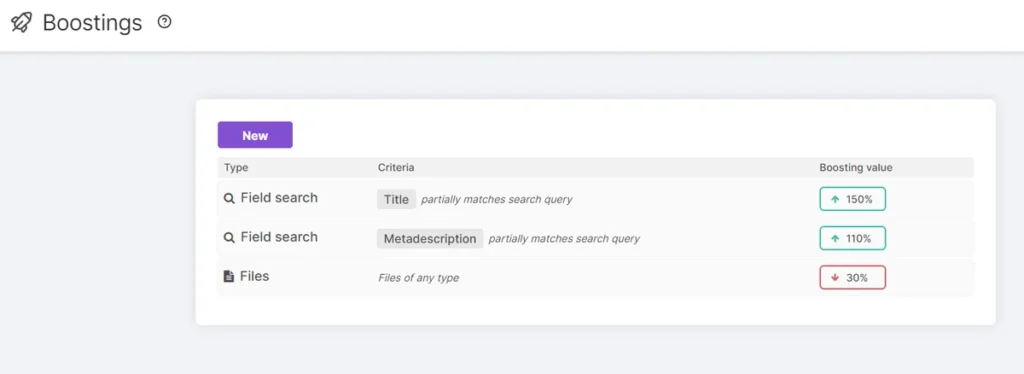
A standard page has a value of 100%. Set a boosting below 100% and you lower those pages in the results. Set it above 100% and they get an extra boost.
How boosting values work
Start soft. Small adjustments usually do the job. Very high values, like 800%, can override the search engine’s own relevance and make results worse. Read more in the Cludo Help Center.
Boosting is just one way to shape your results in Cludo. You can also use Page Rankings to put a specific page first for a specific search, and synonyms to match the different words visitors use.
What matters most is that you actually do it, whether you use Cludo to power your search or your own custom search solution.
See boosting in action
Book a demo and see how easy it is to put your most important content first.
Related Posts
10 Benefits of Adding Search to Your Site
When looking to optimize the user experience throughout your website, an intelligent search function…
Why It’s Time to Re-evalute Your CMS Search
Where many CMS search solutions fall short, Cludo provides an easy to implement, data-driven site search tool.
Search vs. navigate: How people behave on websites?
Navigating and searching are both important ways of finding desirable content. How important is the search box…
